Posts

How to Change the Hostfile Entry in the Cent OS 7

In Order to change the host file entry in the Centos 7, you may need to login on the console using the root credentials and have to run the below command:  # hostnamectl set-hostname Once the above command is executed you may need to restart the network services to ensure the changes made persists in the system. # /etc/init.d/network restart Comment below in case of any queries 

Important Vcenter Appliance CLI commands

Image
vCenter Server services  running status can be checked  using this command service-control --status --all It Should return the result as depicted below:

Running CLI Commands in ESXi using plink software

Image
Get-esxcli will help us to run the CLI commands over the host directly but to extend it we cannot run certain commands directly over the host, In such case, we can use the below script to run directly on the host and achieve our goals. One shot with the script to achieve multiple targets My target was given to check the status of smartd services in each host and disable it, So I have put the commands on the variable $cmd and $cmd2 and executing it in all the machines,  which has been feed in the variable $machines , command get executed in all the hosts fed in the variable $machines . Script :  $user = '' $pswd = '' $cmd = 'etc/init.d/smartd status' $cmd2 = 'chkconfig smartd off' $machines = Get-Content "" foreach ( $MACHINE in $machines ) { Get-VMHost -Name $MACHINE | % {     $ssh = Get-VMHostService -VMHost $_ | where { $_ . Key -eq 'TSM-SSH' }     if ( ! $ssh . Running)...

How to reset the IE settings Through command Line (CMD)

Image
I was just wondering that how to reset the IE personal settings through command line as I am much more interested over the cli functions, just got this command to reset the settings of the IE to the default one. rundll32 inetcpl.cpl ResetIEtoDefaults Run the above code by pressing the (windows key + R), Just type the above command and you will get the below prompt. just select the checkbox and click reset button all is done.

Default powershell commands not getting executed , getting command not recognized.

I was working on some weird cases that some of the basic powershell commands are not getting  executed in the machine and i came to know that the powershell modules are not getting loaded due to which default modules are not getting loaded in the psmodule path. Resolution would be to run the below commands: $PSModulePath = Get-ItemProperty -Path "HKLM:SYSTEM\CurrentControlSet\Control\Session Manager\Environment" -Name "PSModulePath" $newPSModulePath = $PSModulePath.PSModulePath + ";C:\Windows\System32\WindowsPowerShell\v1.0\Modules" Set-ItemProperty -Path "HKLM:SYSTEM\CurrentControlSet\Control\Session Manager\Environment" -Name "PSModulePath" -value $newPSModulePath Else you need to create a PSModulePath value under the below path : HKLM:SYSTEM\CurrentControlSet\Control\Session Manager\Environment and need to enter the value of path mentioned below in the PSModulePath key : %SystemRoot%\system32\WindowsPowerShell\v1.0\M...

How to extract msu/msp/msi/exe files from the command line

We can use the below commands to extract and execute the msu/msp/msi/exe files through cli mode.   Microsoft Hotfix Installer (.exe) setup.exe /t:C: /c Microsoft Update Standalone Package (.msu) expand -F:* update.msu C: cd expand -F:* update.cab C: Microsoft Patch File (.msp) msix patch.msp /out C: msix.zip Windows Installer Package (.msi) msiexec /a setup.msi /qb TARGETDIR=C:

Fetch the List of RDMs Attached in the machine using Powercli

Image
I used to maintain a powercli toolkit to ensure all the redundant tasks which ever to be performed can be automated in the proper way without affecting the running environment. I am sharing a script which comes in handy when you need to identify the list of RDMs attached to the virtual machines in the cluster Get-Cluster | Get-VM | Get-HardDisk -DiskType "RawPhysical","RawVirtual" | Select Parent,Name,DiskType,ScsiCanonicalName,DeviceName | Export-csv -notypeinformation -path "c:\RDMattachedmachine" => Indicates that you have to put the cluster name in the space and execute the command. This command has been tested under vcenter 5.5 and 6.0.  Run with care in the production environment and happy scripting. Kindly put your comments and queries below.

Auto creation and deletion of Snapshots in Vsphere Environment using Powercli

Image
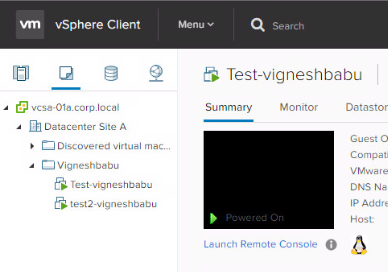
Today we are gonna develop a script that will automatically delete multiple snapshots that has been taken in VMs running in the Vsphere environment. We use powercli to create the script and run over the vcenter where the VMs are hosted Before we go ahead, I would like to share you a small brief on what is powercli, powercli is a command-line interface (CLI) tool for automating vSphere and vCloud management. VMware vSphere PowerCLI debuted as the VMware Infrastructure Toolkit, also called the VI Toolkit. We have created two machine named test-vigneshbabu, test1-vigneshbabu as shown below: Now we are gonna trigger a script that will take the snapshot of these machines as “before patching” as shown below, You can customise the name of the snapshots according to your standards. Code : $servers = Get-Content "c:\vm-serverslist.txt" foreach ( $i in $servers ) {  New-Snapshot -VM $i -Name before_pathing } Note: path of the get-content is customisable and it’s ...

NLM Errors in the Windows SCCM Client

Image
1.     Stop the windows update service, rename or delete the Software Distribution folder (%windir%\softwareDistribution) and start windows update service. This approach provides a fresh start with a new Windows Update data store if the Datastore.edb file is corrupted. 2.     Open Windows update log file under path C:\Windows\WindowsUpdate.log and check latest logs especially NLM error. 3.     Download below KB article from Microsoft catalog site. KB2919355 or you can download the the patches from the below link.     https://www.microsoft.com/en-us/download/details.aspx?id=42334 4.     Uninstall all patches(KB2919355, KB2932046, KB2959977, KB2937592, KB2938439, KB2934018, KB2919442) if it is installed and restart server 5.     Install KB2919355 now on server and restart server again. 6.     Restart the windows update service, Go to control panel, open configuration manage...

Changing the path policy of the SCSI lun device using Powercli in Vmware Vsphere Environment

Image
Today my motto is to change the path policy of the scsi lun from Fixed to round robin. It’s always a pain to change the path policy of the scsi lun device, it takes hours of time to change the path manually in case if we have the large environments of say 2000 ESXi and with more than 400 Devices connected with the Esxi. so we used some Powercli and create a loop to perform the redundant task well in crisp words we tried to automate this task which could save hours of manual works Code: $server = Get-content "C:\hostfile.txt" foreach ($i in $server) { Get-ScsiLun -VmHost $i -CanonicalName "naa.6006*" | where {$_.MultipathPolicy -ne "RoundRobin"} | Set-ScsiLun -MultipathPolicy RoundRobin } Here in the above code I am calling the list of ESXi Host in the file named as hostfile.txt and passing it to the variable $server and this will create an array of characters over the variable $server , Each character represents Esxi hosts on devops...

Rejoin a Computer to domain without Restart using powershell

Image
There are three methods to rejoin the computer to domain without restart Method 1: Test-ComputerSecureChannel -Repair -Credential (Get-Credential) When the above command is executed it will prompt for username and password and enter the domain credentials and result should show as true then the machine is re-added to domain. Method 2: netdom resetpwd /Server:DC /UserD:DomainAdmin /PasswordD:Password The above command should be executed in the command prompt under administrator prompt. Method 3: Reset-ComputerMachinePassword -Credential (Get-Credential) When the above command is executed it will prompt for username and password and enter the domain credentials and result should show as true then the machine is re-added to domain. Stay Tuned and connect with me @ Click to connect

How To Patch and Protect Linux Server Against the Glibc GHOST Vulnerability # CVE-2015-0235

Image
A very serious security problem has been found in the GNU C Library (Glibc) called GHOST. How can I fix GHOST vulnerability and protect my Linux server against the attack? How do I verify that my server has been fixed against the Glibc GHOST vulnerability? A very serious security problem has been found and patched in the GNU C Library called Glibc. It was announced on 27th January 2015. What is the GHOST security bug? Tutorial details Difficulty Easy (rss) Root privileges Yes Requirements Linux + reboot required Estimated completion time 10m From the  RHEL bugzilla : A heap-based buffer overflow was found in __nss_hostname_digits_dots(), which is used by the gethostbyname() and gethostbyname2() glibc function call. A remote attacker could use this flaw to execute arbitary code with the permissions of the user running the application. A mailing list entry with more details, including in-depth analysis and exploit vectors is  here . What C library (Glibc) versi...